- 01 · Source
Bring in the master email
Paste the HTML, upload the .html file, or pull the template straight out of your ESP. Transendly reads it once and tells you what it found: which ESP the tokens belong to, the subject, the preheader, every merge tag.
- 02 · Source
See how it will render before anyone translates it
The same pass scores the HTML for Outlook, Gmail, Apple Mail and mobile, and lists what to fix: CSS that isn't inlined, images with no dimensions, a VML button missing its MSO conditional. Fourteen checks, each explained.
- 03 · Source
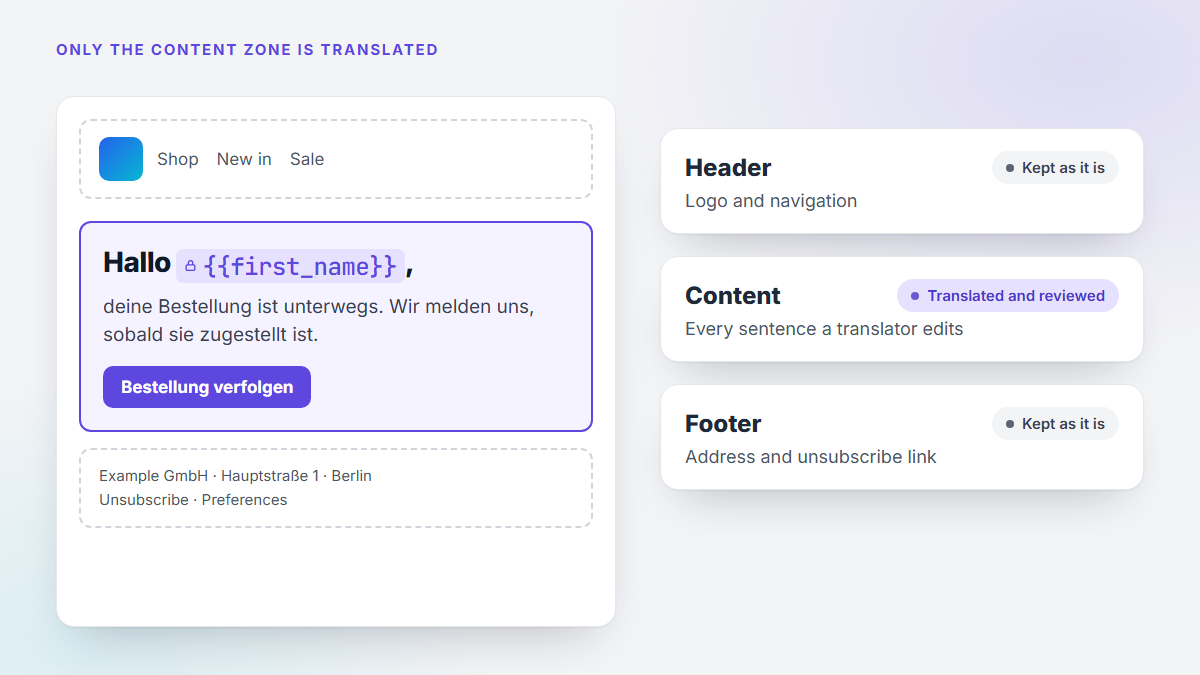
Split it into header, content and footer
Zones are suggested from the email itself, or read from markers you already use. Header and footer are saved per language and reused, so the translator only ever sees the part that changes.
- 04 · Locales
Translate inside the rendered email
Start from an AI draft or type over the text directly in the preview. Merge tags sit outside the editable text. Button URLs, images and legal links can be different for each market, and you can check the result in Gmail and Outlook previews.
- 05 · Review
Approve one language at a time
A reviewer reads each locale and either approves it or sends it back with a note for the translator. A locale cannot reach export without that decision.
- 06 · Exports
Push it back to your ESP
Once every language is approved, each one goes into your ESP as a template, or downloads as HTML for any ESP we don't push to. The merge tags are checked against that ESP's syntax first, and a mismatch stops the push.
For teams that send from an ESP
Email localization where nobody can touch a merge tag.
Pull an HTML template from your ESP, translate only the content, review each language and push it back as a template. The header, the footer and every {{first_name}} stay exactly as you built them.
Deine Frühlingsauswahl ist da, {{first_name}}.
Zwölf Stücke aus Leinen und Wolle, ausgewählt für die Saison. Kostenloser Versand ab {{free_shipping_min}}.
{{{unsubscribe}}}Imports from and pushes back to
Any other ESP: download each language as HTML.
How a campaign moves
From the master email to a reviewed template in each language
Six steps, all inside one campaign. Scroll down; the screen on the left is the app.
Per market
Each market gets its own links, images and legal pages.
In the editor every language has its own button URLs, images and terms link, so the German email sends readers to the German shop and the German T&Cs.
- Button URL
- alder.example/de/fruehling
- Image
- spring-de.jpg
- T&C link
- alder.example/de/agb
- Button URL
- alder.example/fr/printemps
- Image
- spring-fr.jpg
- T&C link
- alder.example/fr/cgv
- Button URL
- alder.example/pl/wiosna
- Image
- spring-pl.jpg
- T&C link
- alder.example/pl/regulamin
Merge tags
Merge tags stay out of the translator's reach
Transendly recognises the tag formats ESPs use and leaves them outside the editable text. Before a push, tags for common fields are checked against the target ESP, and a tag written for a different ESP stops the push with its name in the error.
| Format | Where you'll see it |
|---|---|
{{first_name}} | Handlebars (SendGrid, Mailgun) · Mustachio (Postmark) |
{% if vip %} | Django and Liquid-style tags (Klaviyo) |
*|FNAME|* | Mailchimp merge tags |
%FIRSTNAME% | ActiveCampaign |
{{{unsubscribe}}} | Unescaped Handlebars |
Before anyone translates
Find out how the email will render in Outlook first.
Every import gets a 0–100 score for Outlook, Gmail, Apple Mail and mobile, with each issue explained. Fixing the master once fixes it in every language.
- CSS not inlined
- Images missing alt text
- Images missing width or height
- Deeply nested tables
- No preheader text
- <html> missing a lang attribute
- Animated GIFs
- Subject line too long
- Preheader too long
- VML button without an MSO conditional
- Images that aren't fluid
- Dark background without dark-mode support
- Tables missing role="presentation"
- Deprecated <font> or <center> tags
Roles
Invite every translator and reviewer you work with
Every plan includes unlimited users. Each person gets a role, and translators, reviewers and QA see only the languages assigned to them.
Admin
Workspace, members, billing and the ESP connection.
Operator
Creates campaigns, picks languages, runs exports.
Translator
Edits the content zone of the languages assigned to them.
Reviewer
Approves a language or sends it back with a note.
QA
Reviews the languages assigned to them for QA.
What it is not
Where a TMS stops being the right tool
The email is the input. There are no string files, keys or export formats to manage.
No glossary or translation memory. If you need a full TMS, keep it; Transendly can sit beside it.
One language per download. Each ZIP holds a single language's HTML; there is no archive of every language.
No send reports. The app never sends email, so opens and clicks stay in your ESP's reporting.
Pricing
Plans priced by how many languages you export each month
Exporting or pushing one language uses one run. Nothing is charged per word, and translators cost nothing extra.
Starter
For one team running a few markets.
- 150 export runs a month
- 300 AI translations a month
- Unlimited users and roles
- Unlimited translators, reviewers and QA
- Push to 7 ESPs, HTML download for the rest
Growth
Most teamsFor teams that localize every campaign.
- 500 export runs a month
- 1,000 AI translations a month
- Unlimited users and roles
- Unlimited translators, reviewers and QA
- Push to 7 ESPs, HTML download for the rest
Pro
For high-volume programs and agencies.
- 2,000 export runs a month
- 4,000 AI translations a month
- Unlimited users and roles
- Unlimited translators, reviewers and QA
- Push to 7 ESPs, HTML download for the rest
Enterprise
For volume and terms set together.
- Export volume set by contract
- No monthly cap on AI translations
- Unlimited users and roles
- Unlimited translators, reviewers and QA
- Push to 7 ESPs, HTML download for the rest
Every plan starts with a 21-day trial: 10 export runs, 20 AI translations, unlimited users. One run is one language exported once — a push or a download. When a month's runs are used, exports wait for the next billing period; nothing is charged on top.
Questions
What people ask before they start
What does Transendly actually translate?
The content zone of an HTML email: headline, body copy, button labels, subject line and preheader. The header and footer are saved once per language and reused, and merge tags are kept out of the editable text altogether.
Which ESPs can it push to?
SendGrid, Klaviyo, Brevo, Postmark, ActiveCampaign, Mailgun and Mailchimp. For any other provider, each language downloads as HTML that you upload yourself. What each push creates →
Does it send emails to my subscribers?
No. Transendly writes templates into your ESP. Your lists, flows and sending stay where they are today.
How many languages can a campaign have?
As many as it needs. Each campaign picks its own target languages and the product sets no cap; every language you export uses one run from your plan.
Is the translation done by AI or by people?
Both, in that order if you want. AI Translate produces a first draft inside the email, translators edit it in place, and a reviewer approves each language before it can be exported. You can also skip the AI draft and translate by hand.
Is Transendly a translation management system?
No. There is no glossary, translation memory or string-file workflow, so it can run next to a TMS you already have. How it compares →
Guides
Written for the ESP you already use
Translating SendGrid dynamic templates
Handlebars, versions, and what a translator must leave alone.
KlaviyoKlaviyo email localization
Django-style tags, template folders and one template per language.
SyntaxLiquid vs Handlebars in email
The same variable in two syntaxes, and where each one breaks.
Bring one real campaign and look for a {{tag}} out of place.
21 days, 10 export runs, your own ESP connected. Already have an account? Sign in.